[cicd] 3주차 - Jenkins + ArgoCD
안녕하세요, CICD 학습을 위해 CloudNetaStudy 스터디 모임을 통해 진행한 내용을 정리하였습니다.
3주차는 [GitOps Cookbook] [GitOps Cookbook] 7~8장(272p) - ArgoCD 에 대해 중점적으로 학습합니다.
[실습 환경]
- kind 로 k8s 배포
# 클러스터 배포 전 확인
docker ps

#
kind create cluster --name myk8s --image kindest/node:v1.32.8 --config - <<EOF
kind: Cluster
apiVersion: kind.x-k8s.io/v1alpha4
networking:
  apiServerAddress: "0.0.0.0"
nodes:
- role: control-plane
  extraPortMappings:
  - containerPort: 30000
    hostPort: 30000
  - containerPort: 30001
    hostPort: 30001
  - containerPort: 30002
    hostPort: 30002
  - containerPort: 30003
    hostPort: 30003
- role: worker
EOF

# 확인
kind get nodes --name myk8s
kubens default

# 컨트롤플레인/워커 노드(컨테이너) 확인 : 도커 컨테이너 이름은 myk8s-control-plane , myk8s-worker 임을 확인
docker ps
docker images

# 디버그용 내용 출력에 ~/.kube/config 권한 인증 로드
kubectl get pod -v6

# kube config 파일 확인
cat ~/.kube/config
- docker compose : 컨테이터 2대(Jenkins, gogs) : 호스트 OS 포트 노출(expose)로 접속 및 사용
# 작업 디렉토리 생성 후 이동
mkdir cicd-labs
cd cicd-labs

# cicd-labs 작업 디렉토리 IDE(VSCODE 등)로 열어두기

#
cat <<EOT > docker-compose.yaml
version: '3.7' # Docker Compose 버전 지정 (선택적이지만 권장)

services:
  jenkins:
    container_name: jenkins
    # 🚨 Docker 클라이언트가 포함된 이미지로 변경 (DooD 환경 필수)
    # jenkins/jenkins는 'docker' 명령을 찾을 수 없으므로 'jenkins/blueocean' 등으로 변경
    image: jenkinsci/blueocean:latest
    user: root # 컨테이너 내부 권한 문제 방지를 위해 root로 실행 권장
    restart: unless-stopped
    networks:
      - cicd-network
    ports:
      - "8080:8080"
      - "50000:50000"
    volumes:
      # 호스트 도커 소켓 마운트 (Docker 명령 실행 허용)
      - /var/run/docker.sock:/var/run/docker.sock
      # 데이터 지속성 볼륨
      - ./jenkins_home:/var/jenkins_home

  gogs:
    container_name: gogs
    image: gogs/gogs
    restart: unless-stopped
    networks:
      - cicd-network
    ports:
      - "10022:22"
      - "3000:3000"
    volumes:
      - ./gogs-data:/data

volumes: # <-- 최상위 레벨의 volumes: 블록 (사용자 정의 볼륨)
  jenkins_home:
  gogs-data:

networks: # <-- 최상위 레벨의 networks: 블록 (사용자 정의 네트워크)
  cicd-network:
    driver: bridge
EOT


# 배포
docker compose up -d
docker compose ps

## (방안1) 호스트 mount 볼륨 공유 사용 시
tree jenkins_home
tree gogs-data

## (방안) 도커 불륨 사용 시
docker compose volumes


# 기본 정보 확인
for i in gogs jenkins ; do echo ">> container : $i <<"; docker compose exec $i sh -c "whoami && pwd"; echo; done

# 도커를 이용하여 각 컨테이너로 접속
docker compose exec jenkins bash
exit

docker compose exec gogs bash
exit
- Jenkins 컨테이너 초기 설정
# Jenkins 초기 암호 확인
docker compose exec jenkins cat /var/jenkins_home/secrets/initialAdminPassword

# Jenkins 웹 접속 주소 확인 : 계정 / 암호 입력 >> admin / qwe123
open "http://127.0.0.1:8080" # macOS

# (참고) 로그 확인 : 플러그인 설치 과정 확인
docker compose logs jenkins -f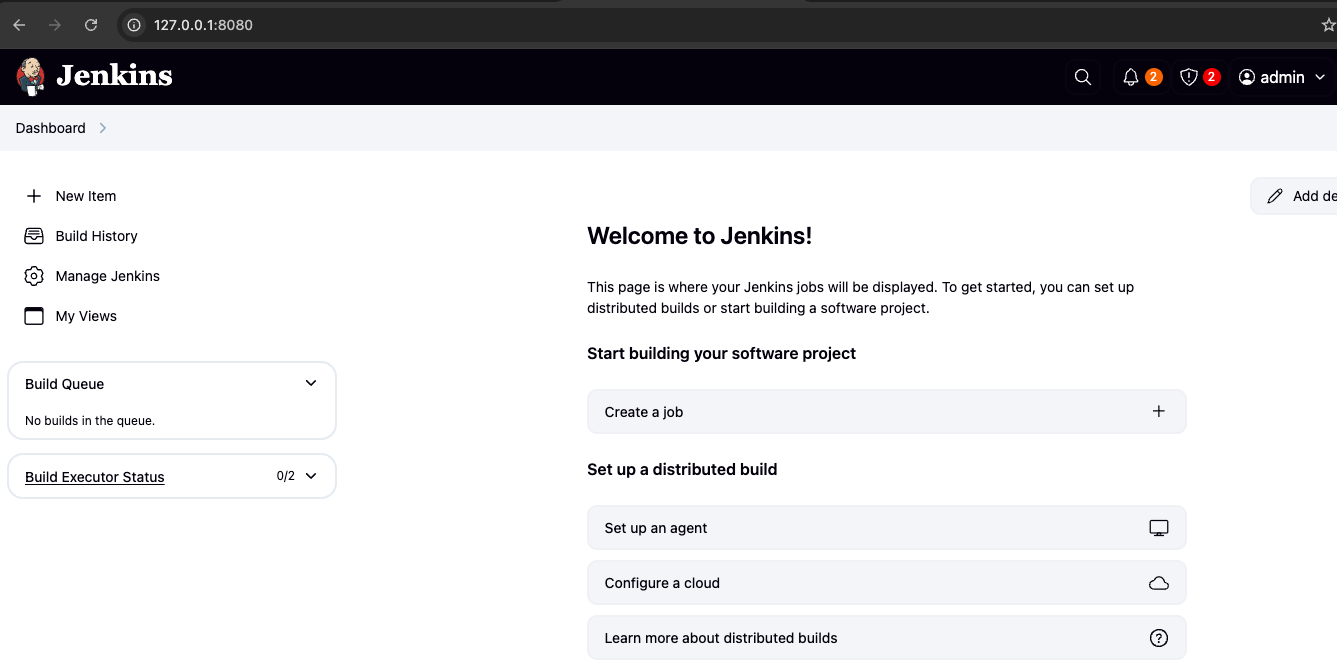
- gogs : Gogs : Gogs is a painless self-hosted Git service - Github , DockerHub , Docs
- Gogs 컨테이너 초기 설정 : Repo(Private) - dev-app , ops-deploy
1) 초기 설정 웹 접속
# 초기 설정 웹 접속
open "http://127.0.0.1:3000/install" # macOS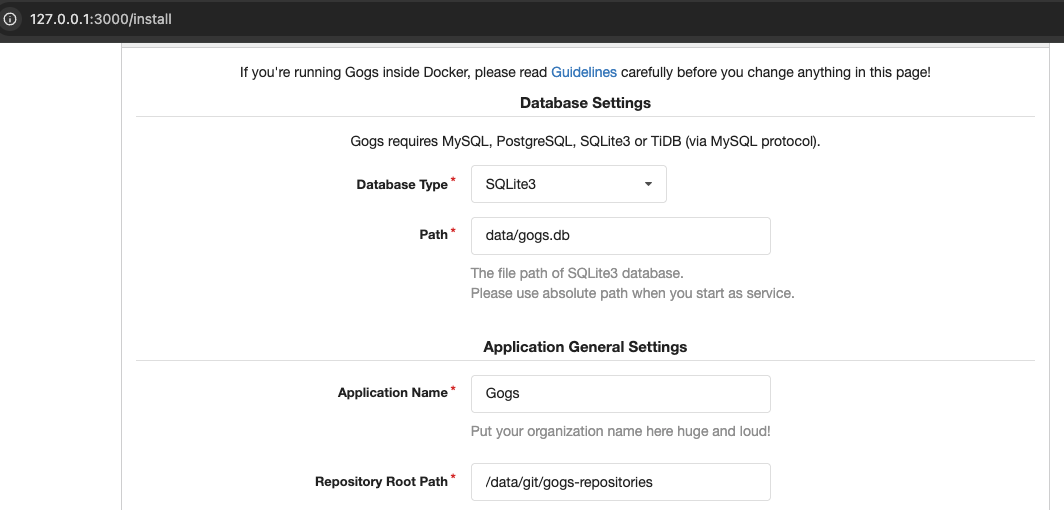
2) Repo 생성 : dev-app(개발팀용), ops-deploy(데브옵스팀용)

- Gogs 실습을 위한 저장소 설정 : gogs 등 컨테이너 내부 작업 진행, or 자신의 Local IDE 에서도 가능
docker exec -it gogs bash
----------------------------------------------
# (옵션) GIT 인증 정보 초기화
git credential-cache exit

#
TMOUT=0
pwd
ls
cd /data # 호스트 mount 볼륨 공유 경로

#
git config --list --show-origin

#
TOKEN=<각자 Gogs Token>
TOKEN=7aa8e88fac50bb72cbed54d212f1262342108261

MyIP=<각자 자신의 IP> # mac(PC IP), windows(ubuntu eth0)
MyIP=192.168.254.110

git clone <각자 Gogs dev-app repo 주소>
git clone http://devops:$TOKEN@$MyIP:3000/devops/dev-app.git
Cloning into 'dev-app'...
...

#
cd /data/dev-app

#
git --no-pager config --local --list
git config --local user.name "devops"
git config --local user.email "a@a.com"
git config --local init.defaultBranch main
git config --local credential.helper store
git --no-pager config --local --list
cat .git/config

#
git --no-pager branch
git remote -v

# server.py 파일 작성
cat > server.py <<EOF
from http.server import ThreadingHTTPServer, BaseHTTPRequestHandler
from datetime import datetime
import socket

class RequestHandler(BaseHTTPRequestHandler):
    def do_GET(self):
        match self.path:
            case '/':
                now = datetime.now()
                hostname = socket.gethostname()
                response_string = now.strftime("The time is %-I:%M:%S %p, VERSION 0.0.1\n")
                response_string += f"Server hostname: {hostname}\n"
                self.respond_with(200, response_string)
            case '/healthz':
                self.respond_with(200, "Healthy")
            case _:
                self.respond_with(404, "Not Found")

    def respond_with(self, status_code: int, content: str) -> None:
        self.send_response(status_code)
        self.send_header('Content-type', 'text/plain')
        self.end_headers()
        self.wfile.write(bytes(content, "utf-8"))

def startServer():
    try:
        server = ThreadingHTTPServer(('', 80), RequestHandler)
        print("Listening on " + ":".join(map(str, server.server_address)))
        server.serve_forever()
    except KeyboardInterrupt:
        server.shutdown()

if __name__== "__main__":
    startServer()
EOF

# (참고) python 실행 확인
python3 server.py
curl localhost
curl localhost/healthz


# Dockerfile 생성
cat > Dockerfile <<EOF
FROM python:3.12
ENV PYTHONUNBUFFERED 1
COPY . /app
WORKDIR /app
CMD python3 server.py
EOF


# VERSION 파일 생성
echo "0.0.1" > VERSION

#
tree
git status
git add .
git commit -m "Add dev-app"
git push -u origin main
...
- Gogs Repo에서 push 확인
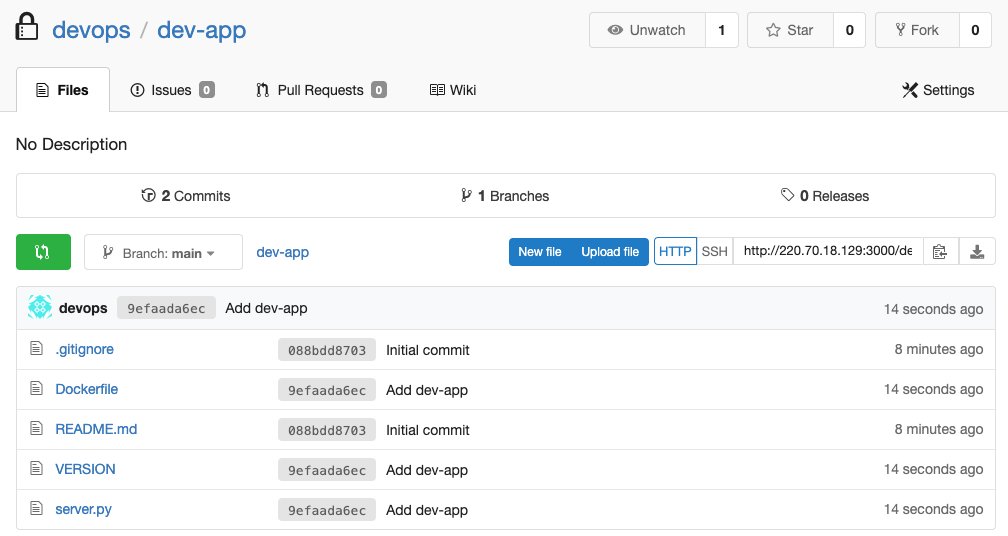
- dockerhub : 자신의 도커 허브 계정에 Token 발급 + Private Repository 생성(dev-app)

Jenkins CI + K8S(Kind)
- 젠킨스는 소프트웨어 개발 프로세스의 다양한 단계를 자동화하는 오픈 소스 서버 시스템입니다. 자바로 작성되었으며, 서블릿 컨테이너(예: 아파치 톰캣) 내에서 실행됩니다.
1. 주요 기능 및 역할
젠킨스는 CI/CD(지속적 통합/배포) 워크플로우 전반을 지원합니다.
- 코드 관리: 중앙 리포지터리에서 최신 코드 가져오기 (Checkout).
- 빌드: 소스 코드 컴파일 및 산출물(아티팩트) 패키징.
- 테스트: 단위 테스트, 통합 테스트, E-E(End-to-End) 테스트 (Selenium 등 활용) 실행.
- 배포: 산출물을 다양한 환경(프로덕션 등)으로 배포.
- 플러그인 연동: Git, Maven, Ant, Java, Python 등 다양한 도구 및 언어와의 연동을 플러그인을 통해 지원합니다.
2. CI/CD 워크플로우 (파이프라인 실행)
젠킨스는 파이프라인을 사용하여 CI/CD 과정을 순차적으로 자동 실행합니다.
| 단계 | 설명 |
| 코드 통합 | 코드 가져오기 -> 단위 테스트 -> 코드 개발 -> 코드 푸시/병합 |
| 빌드/테스트 | 코드 컴파일 -> 통합 테스트 실행 |
| 배포/검증 | 아티팩트 배포 -> E-E 테스트 실행 |
- 실패 시 처리: 파이프라인 진행 중 특정 단계에서 실패하면, 다음 단계는 실행되지 않고 빌드 프로세스 전체가 실패합니다.
- 파이프라인은 젠킨스에서 CI/CD 프로세스를 구현하고 통합하는 데 사용하는 플러그인 스크립트 모음이며, 전체 빌드 프로세스를 정의하는 코드입니다.
1. 파이프라인의 장점
- 코드 (Pipeline as Code): CI/CD 프로세스를 코드로 작성하여 버전 관리하고 팀원과 공유할 수 있습니다.
- 내구성: 젠킨스가 재시작되어도 파이프라인의 실행 상태가 유지됩니다.
- 일시 중지 가능: 사람의 승인/입력을 기다리기 위해 실행을 일시 중단할 수 있습니다.
- 다양성: 분기, 반복, 병렬 처리 등 복잡한 요구 사항을 지원합니다.
2. 파이프라인 주요 용어
| 용어 | 정의 |
| 파이프라인 | 전체 빌드 프로세스 코드 |
| Node / Agent | 파이프라인을 실행하는 시스템 (실제 작업 환경) |
| Stages | stage들의 순차적 묶음 |
| stage | 빌드, 테스트, 배포 등 특정 단계의 작업 정의 |
| steps | stage 내에서 수행되는 단일 작업 (가장 작은 실행 단위) |
| post | 모든 stages 완료 후 수행되는 빌드 후 조치 |
| Directive | environment (환경 변수), when (조건부 실행) 등 동작을 제어하는 지시어 |
3. 파이프라인 구문 유형
| 유형 | 특징 | 권장 여부 | 기본 블록 |
| 선언형 (Declarative) | 쉽게 작성 가능, steps 필수. | 권장 | pipeline { ... } |
| 스크립트형 (Scripted) | Groovy 기반, 복잡하고 커스텀 작업에 용이. | - | node { ... } |
4. 파이프라인 구성 형태 (스크립트 실행 방식)
- Pipeline script: 젠킨스 UI에 스크립트를 직접 입력.
- Pipeline script from SCM: Jenkinsfile을 형상관리 저장소에 보관하고 젠킨스가 이를 호출 실행. (가장 일반적인 방식)
- Blue Ocean 기반: UI로 파이프라인을 시각적으로 구성하면 Jenkinsfile이 자동으로 생성됨.
Deploying to Kubernetes
# 디플로이먼트 오브젝트 배포 : 리플리카(파드 2개), 컨테이너 이미지 >> 아래 도커 계정 부분만 변경해서 배포해보자
DHUSER=<도커 허브 계정명>
DHUSER=yhshim17

cat <<EOF | kubectl apply -f -
apiVersion: apps/v1
kind: Deployment
metadata:
  name: timeserver
spec:
  replicas: 2
  selector:
    matchLabels:
      pod: timeserver-pod
  template:
    metadata:
      labels:
        pod: timeserver-pod
    spec:
      containers:
      - name: timeserver-container
        image: docker.io/$DHUSER/dev-app:0.0.1
        livenessProbe:
          initialDelaySeconds: 30
          periodSeconds: 30
          httpGet:
            path: /healthz
            port: 80
            scheme: HTTP
          timeoutSeconds: 5
          failureThreshold: 3
          successThreshold: 1
EOF
watch -d kubectl get deploy,rs,pod -o wide

# 배포 상태 확인 : kube-ops-view 웹 확인
kubectl get events -w --sort-by '.lastTimestamp'
kubectl get deploy,pod -o wide
kubectl describe pod
...
Events:
  Type     Reason     Age                From               Message
  ----     ------     ----               ----               -------
  Normal   Scheduled  53s                default-scheduler  Successfully assigned default/timeserver-7cf7db8f6c-mtvn7 to myk8s-worker
  Normal   BackOff    19s (x2 over 50s)  kubelet            Back-off pulling image "docker.io/gasida/dev-app:latest"
  Warning  Failed     19s (x2 over 50s)  kubelet            Error: ImagePullBackOff
  Normal   Pulling    4s (x3 over 53s)   kubelet            Pulling image "docker.io/gasida/dev-app:latest"
  Warning  Failed     3s (x3 over 51s)   kubelet            Failed to pull image "docker.io/gasida/dev-app:latest": failed to pull and unpack image "docker.io/gasida/dev-app:latest": failed to resolve reference "docker.io/gasida/dev-app:latest": pull access denied, repository does not exist or may require authorization: server message: insufficient_scope: authorization failed
  Warning  Failed     3s (x3 over 51s)   kubelet            Error: ErrImagePull
TROUBLESHOOTING : image pull error (ErrImagePull / ErrImagePullBackOff)
- 보통 컨테이너 이미지 정보를 잘못 기입하는 경우에 발생
- 혹은 이미지 저장소에 이미지가 없거나, 이미지 가져오는 자격 증명이 없는 경우에 발생
# k8s secret : 도커 자격증명 설정
kubectl get secret -A  # 생성 시 타입 지정

DHUSER=<도커 허브 계정>
DHPASS=<도커 허브 암호 혹은 토큰>
echo $DHUSER $DHPASS

DHUSER=gasida
DHPASS=dckr_pat_JLKruUO5Ee8BGWhqxgRz50_jmT0
echo $DHUSER $DHPASS

kubectl create secret docker-registry dockerhub-secret \
  --docker-server=https://index.docker.io/v1/ \
  --docker-username=$DHUSER \
  --docker-password=$DHPASS

# 확인 : base64 인코딩 확인
kubectl get secret
kubectl get secrets -o yaml | kubectl neat
kubectl get secret dockerhub-secret -o jsonpath='{.data.\.dockerconfigjson}' | base64 -d | jq

# 디플로이먼트 오브젝트 업데이트 : 시크릿 적용 >> 아래 도커 계정 부분만 변경해서 배포해보자
cat <<EOF | kubectl apply -f -
apiVersion: apps/v1
kind: Deployment
metadata:
  name: timeserver
spec:
  replicas: 2
  selector:
    matchLabels:
      pod: timeserver-pod
  template:
    metadata:
      labels:
        pod: timeserver-pod
    spec:
      containers:
      - name: timeserver-container
        image: docker.io/$DHUSER/dev-app:0.0.1
        livenessProbe:
          initialDelaySeconds: 30
          periodSeconds: 30
          httpGet:
            path: /healthz
            port: 80
            scheme: HTTP
          timeoutSeconds: 5
          failureThreshold: 3
          successThreshold: 1
      imagePullSecrets:
      - name: dockerhub-secret
EOF
watch -d kubectl get deploy,rs,pod -o wide

# 확인
kubectl get events -w --sort-by '.lastTimestamp'
kubectl get deploy,pod
Jenkins CD by K8S(Kind)
젠킨스를 통한 K8s 배포(CD)의 아쉬운 점
1. K8s 중심의 CD 모델과 불일치
- 배포 대상 관리: 젠킨스는 기본적으로 스크립트 실행 및 작업 스케줄링 도구이며, 최종적으로 애플리케이션 코드를 빌드하고 배포 환경에 전달하는 역할에 중점을 둡니다. 반면, K8s 환경에서는 배포 상태를 클러스터 자체가 관리하고 유지하는 선언적(Declarative) 방식이 핵심입니다.
- 상태 불일치 및 롤백 어려움: 젠킨스 파이프라인이 성공적으로 종료되었다고 해도, 실제 K8s 클러스터 내의 리소스 상태가 원하는 바와 다를 수 있습니다. 특히 롤백이나 배포 상태 동기화 관리가 젠킨스 스크립트 내에서 복잡하게 이루어져야 합니다.
2. K8s 네이티브 도구의 부재
- GitOps 원칙 미흡: 최근 K8s 환경의 CD는 GitOps 원칙(Git 리포지터리를 진실의 유일한 원천으로 삼고, 클러스터 내 에이전트가 상태를 감시하며 동기화)을 따르는 것이 일반적입니다. 젠킨스는 이러한 GitOps 모델을 구현하기 위해 복잡한 스크립트와 추가 플러그인(예: Argo CD, Flux CD)을 연동해야 하므로, 배포 파이프라인이 무거워지고 관리 복잡성이 증가합니다.
- 구성 관리의 복잡성: K8s 배포를 위해 Helm, Kustomize 등의 구성 관리 도구를 사용해야 하는데, 젠킨스는 이를 파이프라인 내 sh (Shell) 스크립트를 통해 호출해야 하므로 로깅, 디버깅 및 가시성이 떨어집니다.
3. CI/CD 역할의 혼재
- 젠킨스는 CI(지속적 통합)와 CD(지속적 배포)의 모든 단계를 담당하려는 경향이 있어, 파이프라인 스크립트가 커지고 복잡해지기 쉽습니다. K8s 환경에서는 CI는 젠킨스가 담당하더라도, CD는 Argo CD나 Flux CD와 같은 K8s 네이티브 CD 도구로 분리하는 것이 관리 효율성 측면에서 더 권장됩니다.
리포지터리 구성 비교 (단일 vs. 분리)
K8s 환경에서는 분리된 리포지터리 구성이 GitOps 원칙을 적용하고 역할 분리(SecOps)를 명확히 하는 데 유리하므로 장기적으로 더 권장됩니다.
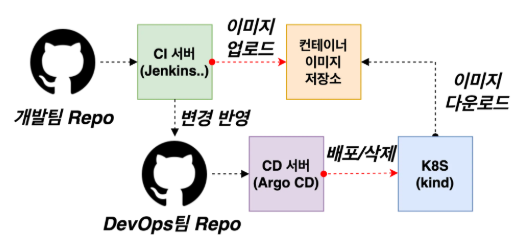
- CI (젠킨스): Dev Repo에서 코드 빌드 -> Docker 이미지 생성 -> 레지스트리에 푸시.
- CD (GitOps 도구): Ops Repo의 K8s YAML 파일에 새 이미지 태그를 자동으로 커밋 -> Argo CD/Flux CD가 Ops Repo를 감지하고 K8s 클러스터에 배포.
Argo CD + K8S(Kind)
Argo CD는 GitOps 패턴을 구현하는 쿠버네티스(Kubernetes)를 위한 선언적(Declarative) 지속적 배포(CD) 도구입니다. Git 리포지터리를 애플리케이션의 '진실의 유일한 원천(Source of Truth)'으로 삼아, K8s 클러스터의 실제 상태를 원하는 상태와 지속적으로 동기화합니다.
1. 핵심 개념 및 작동 방식 (GitOps)
Argo CD의 작동 방식은 'Git'과 'K8s 클러스터'의 상태를 비교하고 일치시키는 데 집중됩니다.
| 개념 | 설명 |
| 선언적 CD | 애플리케이션 정의, 구성, 환경이 코드 형태로 선언되어 Git에 버전 관리되어야 합니다. |
| Target state (원하는 상태) | Git 리포지터리에 있는 파일(K8s manifests)이 정의하는 배포되어야 할 상태입니다. |
| Live state (실제 상태) | K8s 클러스터에 현재 실제로 배포되어 실행 중인 상태입니다. |
| Sync status | Live state와 Target state가 일치하는지 여부입니다. Argo CD는 이를 지속적으로 감지합니다. |
| Sync (동기화) | Live state를 Target state와 일치시키기 위해 K8s 클러스터에 변경 사항을 적용하는 프로세스입니다. |
2. Argo CD의 주요 구성 요소 (Architecture)
Argo CD는 K8s 클러스터 내에서 실행되는 여러 컴포넌트로 구성되어 GitOps를 구현합니다.
- Application Controller: K8s 리소스를 지속적으로 모니터링하며, Git의 Target state와 현재의 Live state를 비교합니다. OutOfSync 상태를 감지하고 동기화(Sync) 작업을 실행합니다.
- API Server: Web UI, CLI, CI/CD 시스템에서 사용되는 gRPC/REST 서버입니다. 애플리케이션 관리, 상태 보고, 동기화/롤백 호출, 인증/RBAC 등을 담당합니다.
- Repository Server: Git 리포지터리의 로컬 캐시를 유지하며, Kustomize, Helm, YAML 등으로부터 K8s 매니페스트(YAML)를 생성하는 역할을 합니다.
- Redis: K8s API 및 Git 요청 부하를 줄이기 위한 캐싱을 담당합니다.
- ApplicationSet Controller: 멀티 클러스터 환경에서 여러 애플리케이션 배포를 효과적으로 관리하고 패키징합니다.
3. 핵심 기능 요약
| 기능 영역 | 주요 내용 |
| 배포 및 관리 | 자동 배포 및 다중 클러스터 지원. Git에 커밋된 모든 구성으로 롤백 가능 |
| 구성 지원 | Kustomize, Helm, Jsonnet, YAML 등 다양한 구성 관리/템플릿 도구 지원 |
| 상태 감지 | 애플리케이션 리소스의 Health status 분석 및 구성 차이(Drift) 자동 감지 및 시각화 |
| 자동화 및 CI 연동 | Web UI/CLI 제공, Webhook (GitHub, GitLab 등) 연동, 액세스 토큰을 통한 CI/CD 시스템과의 통합 |
| 고급 배포 | PreSync, Sync, PostSync hooks를 통한 Blue/Green, Canary 등 복잡한 배포 전략 지원 |
| 보안 및 운영 | SSO 통합 (OIDC, LDAP 등), Multi-tenancy 및 RBAC 정책, 애플리케이션 이벤트 및 API 호출에 대한 Audit trails 제공 |
Argo CD 설치
# 네임스페이스 생성 및 파라미터 파일 작성
cd cicd-labs

kubectl create ns argocd
cat <<EOF > argocd-values.yaml
dex:
  enabled: false

server:
  service:
    type: NodePort
    nodePortHttps: 30002
  extraArgs:
    - --insecure  # HTTPS 대신 HTTP 사용
EOF

# 설치 : Argo CD v3.1.9 , (참고) 책 버전 v2.10.5
helm repo add argo https://argoproj.github.io/argo-helm
helm install argocd argo/argo-cd --version 9.0.5 -f argocd-values.yaml --namespace argocd

# 확인
kubectl get pod,svc,ep,secret,cm -n argocd
kubectl get crd | grep argo
applications.argoproj.io                     2024-04-14T08:12:16Z
applicationsets.argoproj.io                  2024-04-14T08:12:17Z
appprojects.argoproj.io                      2024-04-14T08:12:16Z

kubectl get appproject -n argocd -o yaml

# configmap
kubectl get cm -n argocd argocd-cm -o yaml
kubectl get cm -n argocd argocd-rbac-cm -o yaml
...
data:
  policy.csv: ""
  policy.default: ""
  policy.matchMode: glob
  scopes: '[groups]'

# 최초 접속 암호 확인
kubectl -n argocd get secret argocd-initial-admin-secret -o jsonpath="{.data.password}" | base64 -d ;echo
XxJMMJUv8MHZa-kk

# Argo CD 웹 접속 주소 확인 : 초기 암호 입력 (admin 계정)
open "http://127.0.0.1:30002" # macOS
## Windows OS경우 직접 웹 브라우저에서 http://<Ubuntu Eth0 IP>:30002 접속
- Argo CD 웹 접속 확인
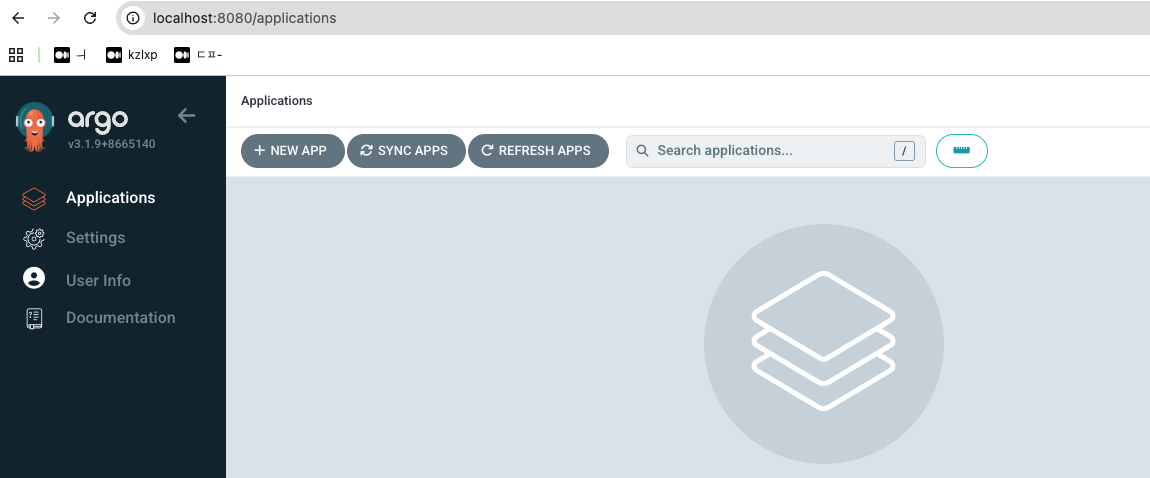
- ops-deploy Repo 등록 : Settings → Repositories → CONNECT REPO 클릭
- connection method : VIA HTTPS
- Type : git
- Project : default
- Repo URL : http://***<자신의 IP>***:3000/devops/ops-deploy
- Username : devops
- Password : <Gogs 토큰>
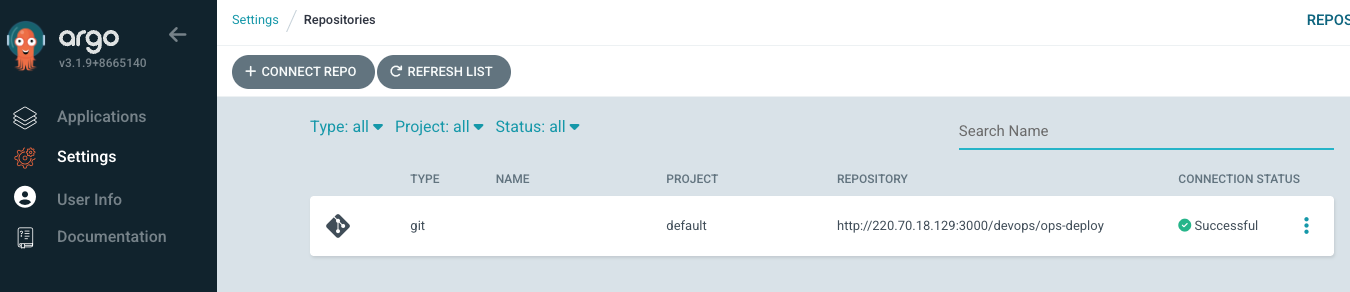
Repo(ops-deploy) 에 nginx helm chart 를 Argo CD를 통한 배포
#
cd cicd-labs

MyIP=192.168.254.110
TOKEN=418652c282eb2b73c0cce236ac47b5c372fe9d6e
echo $MyIP $TOKEN

git clone http://devops:$TOKEN@$MyIP:3000/devops/ops-deploy.git
cd ops-deploy

#
git config --local user.name "devops"
git config --local user.email "a@a.com"
git config --local init.defaultBranch main
git config --local credential.helper store
git --no-pager config --local --list
git --no-pager branch
git remote -v

#
VERSION=1.26.1
mkdir nginx-chart
mkdir nginx-chart/templates

cat > nginx-chart/VERSION <<EOF
$VERSION
EOF

cat > nginx-chart/templates/configmap.yaml <<EOF
apiVersion: v1
kind: ConfigMap
metadata:
  name: {{ .Release.Name }}
data:
  index.html: |
{{ .Values.indexHtml | indent 4 }}
EOF

cat > nginx-chart/templates/deployment.yaml <<EOF
apiVersion: apps/v1
kind: Deployment
metadata:
  name: {{ .Release.Name }}
spec:
  replicas: {{ .Values.replicaCount }}
  selector:
    matchLabels:
      app: {{ .Release.Name }}
  template:
    metadata:
      labels:
        app: {{ .Release.Name }}
    spec:
      containers:
      - name: nginx
        image: {{ .Values.image.repository }}:{{ .Values.image.tag }}
        ports:
        - containerPort: 80
        volumeMounts:
        - name: index-html
          mountPath: /usr/share/nginx/html/index.html
          subPath: index.html
      volumes:
      - name: index-html
        configMap:
          name: {{ .Release.Name }}
EOF

cat > nginx-chart/templates/service.yaml <<EOF
apiVersion: v1
kind: Service
metadata:
  name: {{ .Release.Name }}
spec:
  selector:
    app: {{ .Release.Name }}
  ports:
  - protocol: TCP
    port: 80
    targetPort: 80
    nodePort: 30000
  type: NodePort
EOF

cat > nginx-chart/values-dev.yaml <<EOF
indexHtml: |
  <!DOCTYPE html>
  <html>
  <head>
    <title>Welcome to Nginx!</title>
  </head>
  <body>
    <h1>Hello, Kubernetes!</h1>
    <p>DEV : Nginx version $VERSION</p>
  </body>
  </html>

image:
  repository: nginx
  tag: $VERSION

replicaCount: 1
EOF

cat > nginx-chart/values-prd.yaml <<EOF
indexHtml: |
  <!DOCTYPE html>
  <html>
  <head>
    <title>Welcome to Nginx!</title>
  </head>
  <body>
    <h1>Hello, Kubernetes!</h1>
    <p>PRD : Nginx version $VERSION</p>
  </body>
  </html>

image:
  repository: nginx
  tag: $VERSION

replicaCount: 2
EOF

cat > nginx-chart/Chart.yaml <<EOF
apiVersion: v2
name: nginx-chart
description: A Helm chart for deploying Nginx with custom index.html
type: application
version: 1.0.0
appVersion: "$VERSION"
EOF
# git push
git status && git add . && git commit -m "Add nginx helm chart" && git push -u origin main
Argo CD에 App 등록 : Application → NEW APP
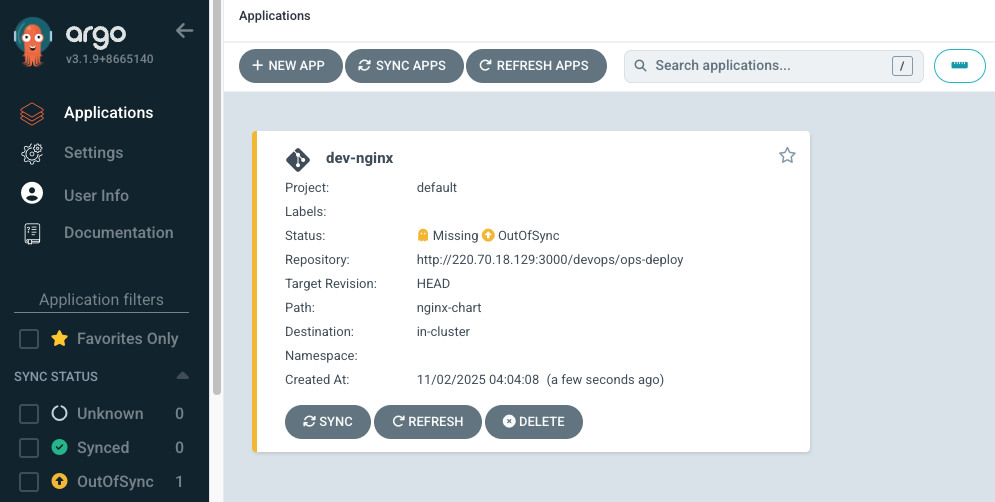
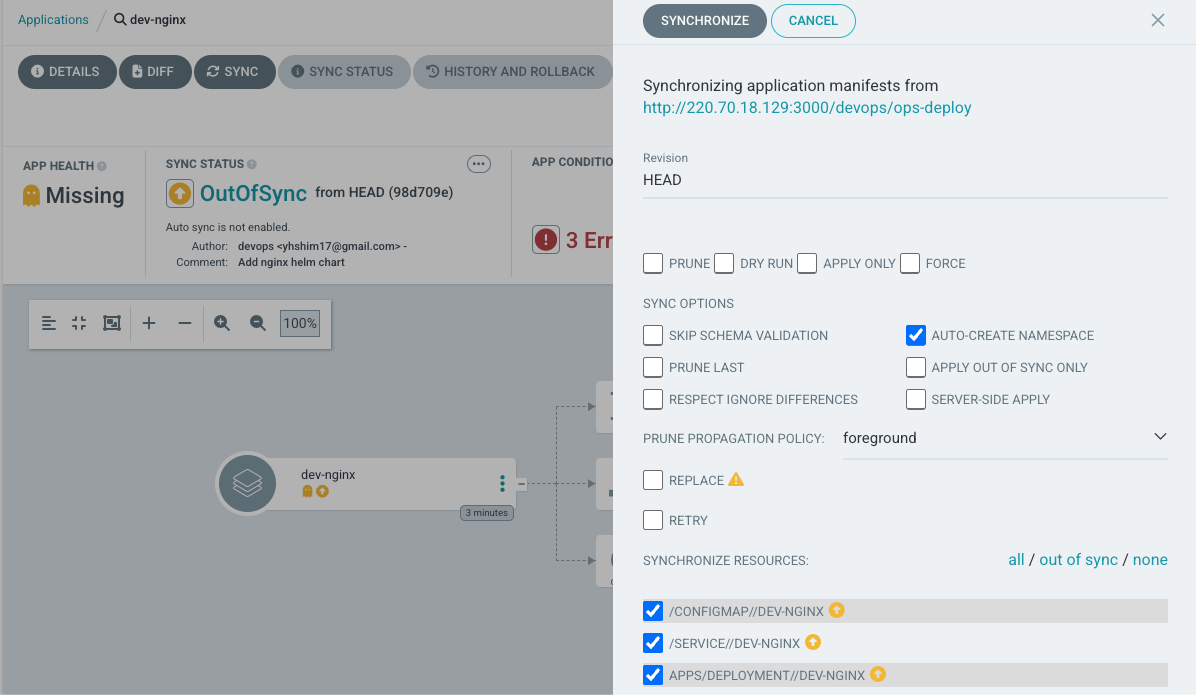
SYNC 클릭 으로 K8S(Live) 반영 확인 : 생성될 리소스 확인
Jenkins CI + Argo CD + K8S(Kind)
Repo(ops-deploy) 기본 코드 작성
#
cd ops-deploy

#
mkdir dev-app

# 도커 계정 정보
DHUSER=<도커 허브 계정>
DHUSER=gasida

# 버전 정보
VERSION=0.0.1

#
cat > dev-app/VERSION <<EOF
$VERSION
EOF

cat > dev-app/timeserver.yaml <<EOF
apiVersion: apps/v1
kind: Deployment
metadata:
  name: timeserver
spec:
  replicas: 2
  selector:
    matchLabels:
      pod: timeserver-pod
  template:
    metadata:
      labels:
        pod: timeserver-pod
    spec:
      containers:
      - name: timeserver-container
        image: docker.io/$DHUSER/dev-app:$VERSION
        livenessProbe:
          initialDelaySeconds: 30
          periodSeconds: 30
          httpGet:
            path: /healthz
            port: 80
            scheme: HTTP
          timeoutSeconds: 5
          failureThreshold: 3
          successThreshold: 1
      imagePullSecrets:
      - name: dockerhub-secret
EOF

cat > dev-app/service.yaml <<EOF
apiVersion: v1
kind: Service
metadata:
  name: timeserver
spec:
  selector:
    pod: timeserver-pod
  ports:
  - port: 80
    targetPort: 80
    protocol: TCP
    nodePort: 30000
  type: NodePort
EOF

#
git add . && git commit -m "Add dev-app deployment yaml" && git push -u origin main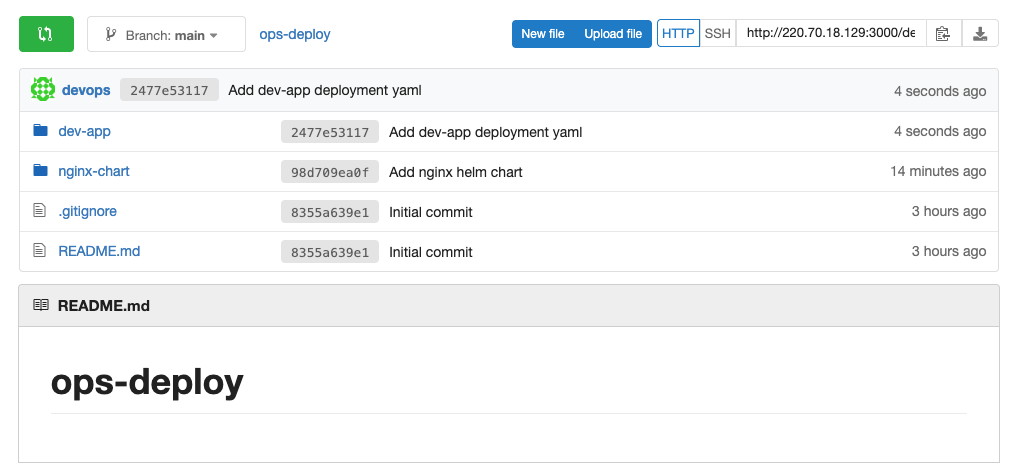
Repo(ops-deploy) 를 바라보는 ArgoCD App 생성
#
echo $MyIP

cat <<EOF | kubectl apply -f -
apiVersion: argoproj.io/v1alpha1
kind: Application
metadata:
  name: timeserver
  namespace: argocd
  finalizers:
  - resources-finalizer.argocd.argoproj.io
spec:
  project: default
  source:
    path: dev-app
    repoURL: http://$MyIP:3000/devops/ops-deploy
    targetRevision: HEAD
  syncPolicy:
    automated:
      prune: true
    syncOptions:
    - CreateNamespace=true
  destination:
    namespace: default
    server: https://kubernetes.default.svc
EOF

#
kubectl get applications -n argocd timeserver
kubectl get applications -n argocd timeserver -o yaml | kubectl neat
kubectl describe applications -n argocd timeserver
kubectl get deploy,rs,pod
kubectl get svc,ep timeserver

#
curl http://127.0.0.1:30000
curl http://127.0.0.1:30000/healthz
open http://127.0.0.1:30000